MFCS Computer
Services Intelligent Solutions
and Consulting Services
Introducing the....
Easy Seller Fee Calculator!
Works with Windows 98, 98SE, ME, NT, 2000
and XP
Developed by Marty Flynn Available via direct
download OR on CD! NEW Version 1.7.1 Just Released!
*Please
read* - When you send your payment through
PayPal, the download information and confirmation is automatically sent
to your registered PayPal email address. If your registered PayPal
email address is not monitored or is no longer in use, you will NOT
receive the download instructions. Please check the email address you
have registered with PayPal to make sure it is valid. This is not only
necessary for you to receive the download instructions, but is a vital
part in maintaining your online transaction security. Thank you for
your cooperation.
*The
price of this item is for the DOWNLOAD
version. Add
$3.00 and have it shipped on CD right to your home or business!
(USA Only-additonal charges apply for international shipment.)
A
simple, easy to use calculator that is NOT an Excel spreadsheet or an
application with many pages to sift through to get your final results.
You get your results as you type and click! Instantly!
4/5/08-
Update for the new eBay fees 12/16/06-
Minor update for the new stores fees 7/17/06-
Added Multi invoicing and paper type and printer selection to the log
7/04/06- Fixed some bugs in the store calculations
as well as added exclusion of S&H from invoices. 2/21/06- Updated
to reflect the eBay fee changes effective 2/26/06 at midnight PST.
3/25/05 - More new features! That's right, we've now
added full editing to the log file! Edit any field, (except date
entered), and save it! Cool.....a new research facilty has been added
as well. Search on various aspects of online sales via eBay, Google,
Froogle, and more! 2/19/05 -
The NEW version is here! Now updated to reflect the new eBay fee
structure which goes into effect 2/18/2005.
By customer request, we've
added the additional features listed below:
Stores! That's right, now the
Easy Seller Calculator supports eBay stores! All the features you would
expect. Simply click the Store button and the stores fee structure goes
into action. With just one click! Cool! It's like getting another
application for FREE! And, easily switch between stores calculations
and auction calculations with one click!
Templates!
You asked for it, you got it! Now setup your favorite scenario with any
upgrades, start price, end price, it's unlimited! You can even save a
store scenario with an auction scenario, in one template! Cool! Load
templates, save templates and even delete that obsolete one!
Packing Slips! You asked for it, you got it! Don't work on
commission? Just want to print a quick Packing Slip for your
auction/store customer, you can! It lists the Customer name, item#,
Item description, end price, shipping and handling and total. Just like
the existing invoice, only modified as a Packing Slip! Don't worry,
Invoices are still here too!
Log file
- Now modified to identify an item as a store or auction and save it
right in the log for you!
New shortcuts across
the top of the program to quickly get you to your favorite spot, Log
file, Invoice/Packing Slips, Templates and popular shipping sites for
easy reference!
08/09/04 - It
has been brought to our attention that the Easy Seller Calculator was
adding FVF fees even when the reserve fee was not met. This was a bug
and
has been corrected in this latest version. While researching this bug,
we
also found that PayPal fees were being generated as well, even when the
reserve price was not met. This bug has been
corrected in
this latest version.
By customer request, we've added the
features listed below:
All
currency values, throughout the application, are now displayed and saved
in two decimal format, "0.00". This makes the application easier to
read and
more consistent throughout.
From the main
interface, if you have a PayPal merchant account, select that
option and click save, and it will always load with this setting. Also,
if
you do not accept PayPal at all, unchecking the Accept PayPal option and
clicking save, will always load with this setting.
Added
the ability to regenerate invoices on the fly, without having to
backout to the main interface. So now you can change the item#,
description,
Customer name, or the Commission rate and instantly re-generate an
invoice!
You can also instantly save it to the log!
07/20/04 - By customer
request, we've added a number of features:
The eBay Border upgrade has been
added.
Shipping cost- Now calculates difference
between S&H charged and actual shipping cost, and adds to the
net proceeds! Cool!
Item Cost- You can now
enter the item cost and it instantly deducts from Net
proceeds! Cool!
Gross and Net profits shown as
you type and click! Cool!
Enhanced Invoices -
Now you can select whether or not to include eBay/PayPal fees on your
client invoices!
Commission fees - Now you can
have the system calculate your commission before or after the
eBay/PayPal fees! Cool!
Extra commission fees -
Now there's a field to add any additional fees you charge your
consignment clients! Cool!
Log Viewer - Added
options to allow printing and deleting items directly from the
log!
Log Viewer - Qty Listed, Qty Sold and item
cost are automatically added to the log!
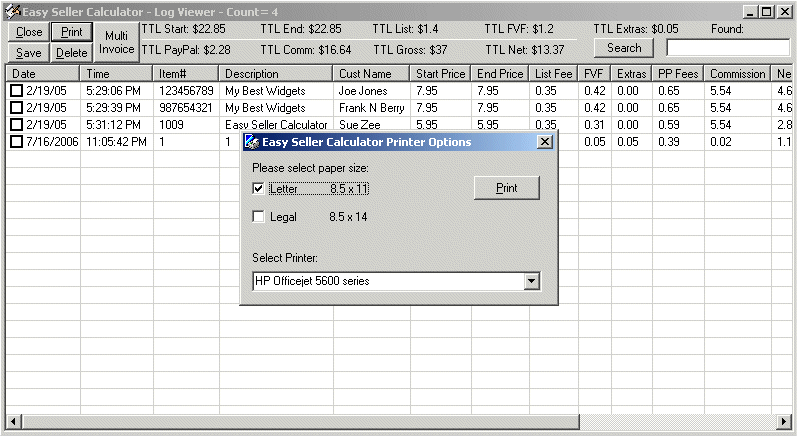
06/24/04 - By customer
request, now you can view your log file, see a summary of all fees,
commissions and even search for an item! Cool!! (see the screenshot
below).
03/25/04 -
By customer request, now supports multiple item listings
in the calculator, Invoices and log! Cool!! (see the
screenshots below).
03/08/04
- Are you a Trading Assistant on eBay? Do you work on
consignment? Well now the Easy Seller Fees calculator generates
Invoices and calculates commissions too!
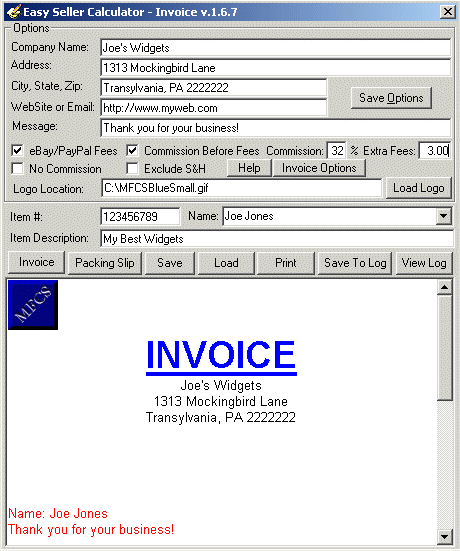
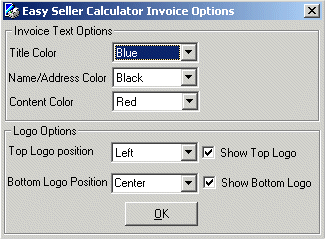
Generate and print Invoice for
each item with a breakdown of all fees and your commission too!
Saves each Invoice in RichText format (*.RTF) for easy
reprinting, (if you choose to)!
Save each
Invoices data to a seperate log file, (in CSV format), for easy
importing into your favorite accounting program! All fees,
commissions and net payouts! Cool!
Saves your
company name, address and a custom message, so it instantly prints on
the invoice! (Check out the screenshots below).
02/26/2004 - By
customer requests, shipping and handling added and included when
calculating PayPal fees. Net Proceeds also added (End Amount - Total
Fees). Cool!
01/29/2004
- Now updated to reflect the new eBay fee structure which goes into
effect 2/2/2004.
Want an easy way to calculate
your listing fees BEFORE you list? Want
to save time and instantly calculate your listing fees?
Want to instantly know what your PayPal® fees will be BEFORE you accept
PayPal®? Want to see your listing fees so fast that
they appear as you type?
Look no further! The Easy
Seller Calculator does it all!
My name is Marty Flynn,
and I am a long time PC technician, LAN
and WAN engineer, Network
Designer and programmer. I
have been working with computers for well over 10 years, and have
designed, built and worked on thousands of computers, from PC's to
servers to mainframes, and have written literally hundreds of custom
applications for data tracking, manipulation, conversion as
well as many networking programs.
"I started selling on
eBay and entering all my sales into an Excel spreadsheet. It
quickly became apparent, that this was simply too cumbersome and crude
to work with."
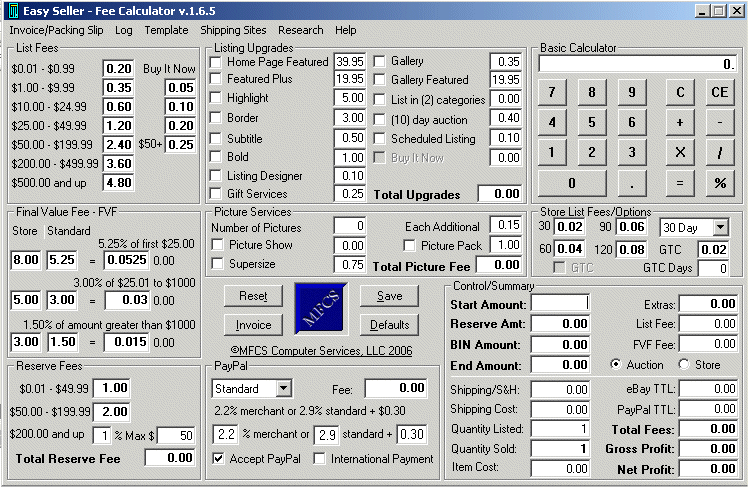
The Easy
Seller Calculator is
a stand-alone calculator - It instantly displays your
eBay® listing fees as you type and select listing options! No pages to
sift through to get your results, no Excel required on your system, it
instantly produces results as you type! Here's a list of some of the
great features of the Easy Seller
Calculator :
Show results INSTANTLY as you
type!
One page
results - everything is displayed right in front of you! Even
as you click and type options!
Pop-up help on every field with a detailed description!
Let's you change any fee item to any number
- if eBay has a special Gallery price, (or a special on any
listing fee) , type it in and it will instantly calculate with the new
price! Cool!!
When
eBay® or PayPal® change their fees, well guess what? you can change the
fees in the system too!
Fee
changes can be saved with the click of a button.
The program does not require constant
updates when fee structures change.
Built-in Basic Calculator
for calculating anything!
Instant access to the most current, posted,
eBay® and PayPal® fee structures for quick reference!
How many times have you
simply wanted to find out what it would cost to list your item, without
having to go through the entire listing process, only to find
out you needed to start your listing higher AND remove some of
the extra features, you thought were going to Make your item
stand out ? Now, with the Easy
Seller Calculator, you know
instantly! I'm not kidding when I say this system
is easy.
Are
you just starting out selling on eBay, and don't have a clue as to how
much listing will cost? Are you a seasoned eBay® seller looking for a
quicker way to instantly see your listing fees before you
list an item? Look no further... The Easy
Seller Calculator will get your answers instantly
as you type and select your listing options in the
application .
No lengthy manuals to read, no need for a
massive training lesson to use this system. It's ready to go right out
of the box!
Fully functional on Windows 98,
98SE, ME, NT, 2000 and XP
The Easy Seller Calculator is
an easy to use, fully functional, eBay® and PayPal® calculator, that
instantly provides your listing and closing fees as you type
and click!. Best of all, it's available for immediate
download, or on CD, whichever you prefer!
eBay® is a registered
trademark of eBay, inc
PayPal® is a registered trademark of PayPal, inc
*Disclaimer
- MFCS Computer Services assumes NO liability as to the use or
mis-use of this software.
This software is provided "AS-IS" and is used at the buyer's
discretion. Buyer assumes all liability as to the use and/or
mis-use of this product. License granted for this product, is for use
on (1) PC. Use of this product on more than (1) PC
requires the purchase of additional licenses. http://www.hitechautoinc.com/http://www.hitechautoinc.com/used-cars.asp

 NEW Version 1.7.1 Just Released!